Customizable Month on Two Pages Calendar
True organization is rarely one-size-fits-all. For creators, entrepreneurs, and busy professionals, a pre-printed planner often feels restrictive rather than liberating. The Customizable Month on Two Pages Calendar solves this friction by offering a completely blank, undated foundation. This template strips away distracting graphics, heavy colors, and rigid structures to provide a clean slate for your specific workflow. By removing visual noise and utilizing super thin lines, this insert allows you to build a planning system that serves your actual needs rather than forcing you into someone else’s idea of productivity.
The beauty of this customizable month on two pages calendar lies in its absolute neutrality. Because the days of the week are left entirely blank, you retain full control over the layout's typography and structure. Whether you prefer a traditional Sunday start, a business-focused Monday start, or an unconventional Thursday start to align with a creative sprint cycle, the choice is yours. This flexibility makes it an essential tool for anyone who views their planner as a working document rather than just a date tracker.
Designing Your Ideal Monthly Layout
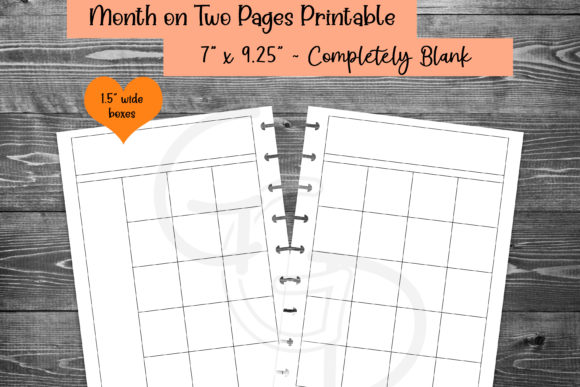
When you remove pre-set constraints, you gain the ability to design for function. The blank header and sidebar on the left offer prime real estate for customization that standard planners cannot match. Instead of settling for generic "Notes" sections, consider how your specific role requires information to be presented at a glance.
For Content Creators and Marketers: Use the left sidebar to track campaign phases or content pillars. Since the calendar grid is blank, you can color-code days based on platform (e.g., Instagram, Blog, Newsletter) or production stage (Drafting, Editing, Publishing). The super thin lines ensure that even when you add highlighters or digital markers, the underlying structure remains legible without competing with your annotations.
For Educators and Academics: Align your week to match your teaching schedule. If your classes run on a rotating block schedule or a Tuesday/Thursday intensive format, label your columns accordingly. The undated nature means you can skip breaks or holidays without wasting pages, creating a continuous academic flow that spans semesters seamlessly.
For Freelancers and Small Business Owners: Transform the monthly spread into a project dashboard. Use the main grid for client deadlines and deliverables, while reserving the left sidebar for invoicing schedules, lead generation goals, or quarterly KPIs. Because there are no distracting images, your focus remains strictly on revenue-generating activities and critical milestones.
Typography and Hand Lettering Freedom
One of the most significant advantages of blank day headers is the freedom to choose your own font. For those who practice hand lettering or calligraphy, this template acts as a canvas. You can match your planner’s aesthetic to your brand identity or current mood. Digital users can select from hundreds of fonts in apps like Goodnotes to create a cohesive visual language. Even if handwriting isn't your strength, the clean lines provide excellent guides for neat printing, ensuring your planner looks professional and intentional.
Technical Specifications for Seamless Integration
A printable insert is only useful if it fits your existing system perfectly. These printables are sized at 7 x 9.25 inches, a dimension specifically chosen to accommodate popular binding methods. The margins are engineered to handle Happy Planner discs, Erin Condren coils, and AE Clouds rings without punching through your writing space or cramping the layout. This attention to physical specifications ensures that your customizable month on two pages calendar feels like a native part of your binder, not an awkward addition.
The undated format further enhances longevity. You buy it once and use it indefinitely. There is no expiration date on the file, and no wasted paper if you miss a month. This sustainability aspect appeals to eco-conscious users and those who take intermittent breaks from structured planning. When you are ready to plan again, the template is waiting, exactly as you left it.
Digital vs. Print: Adapting to Your Workflow
Modern planning often exists in a hybrid state. Recognizing this, every design includes two distinct download types optimized for different mediums. Understanding how to leverage both ensures you get maximum value from the template.
- Print-Perfect Files: These are formatted at exact dimensions. You never need to adjust scaling percentages or worry about border shifts. Simply load your paper and print. The super thin lines are calibrated for home printers, appearing crisp but unobtrusive on standard and premium paper stocks.
- Digital-Ready Files: Optimized for tablet use, these files open directly in PDF readers and note-taking apps like Goodnotes. The resolution is sharp for zooming, and the lack of heavy background colors reduces eye strain during long planning sessions. Digital users can utilize layers to create reusable stickers or stamps for recurring events, maximizing the efficiency of the blank grid.
Maintaining Clarity Without Visual Clutter
The decision to exclude distracting images and colors is intentional. In a world of constant notification and visual overload, your planner should be a sanctuary of clarity. Heavy graphics can sometimes dictate how you use a space; a floral border might discourage you from writing a messy brainstorming list across it. By keeping the template minimal, you signal to your brain that this is a functional workspace. The super thin lines provide necessary guidance for alignment without creating visual weight that competes with your content. This balance is crucial for maintaining long-term consistency in your planning habit.
Strategic Applications for Diverse Goals
Beyond daily scheduling, this customizable month on two pages calendar supports higher-level strategic thinking. The two-page spread offers enough surface area to map out complex timelines that don't fit on a single page.
Habit Tracking Integration: Dedicate the bottom third of the right page or the entirety of the left sidebar to habit tracking. Because the grid is blank, you can draw custom trackers that align perfectly with specific dates, rather than trying to squeeze habits into pre-printed boxes that are too small.
Financial Planning: Use the spread to visualize cash flow. Map out bill due dates, expected income deposits, and savings transfers directly onto the calendar grid. The blank headers allow you to label weeks by fiscal periods or pay cycles rather than calendar weeks, providing a more accurate picture of financial health.
Creative Project Sprints: For writers, designers, or developers working in sprints, rename the days to reflect workflow stages (e.g., Research, Outline, Draft, Review). This transforms the calendar from a timekeeper into a process manager, keeping you accountable to the work itself rather than just the clock.
Building a Sustainable Planning Practice
Consistency in planning comes from having tools that adapt to your evolving life. A rigid planner works great until your job changes, your family grows, or your creative focus shifts. The customizable nature of this blank template means it evolves with you. You might use the left sidebar for meal prep one month and for podcast guest outreach the next. This fluidity prevents the frustration that leads to abandoned planners.
By investing in a high-quality, versatile foundation, you stop searching for the "perfect" planner and start building the perfect system. The Customizable Month on Two Pages Calendar provides the structure; your creativity and intention provide the substance. Whether printed on premium paper or annotated digitally, it remains a steadfast partner in organizing your professional and personal aspirations.