Mastering the 7 X 10 Dot Grid Journal with Bleed for Professional KDP Publishing
Creating a successful low-content or no-content book on Amazon Kindle Direct Publishing (KDP) requires more than just uploading a generic PDF. The difference between an amateur product and a professional-grade journal often lies in the precision of the interior design and the strategic use of trim sizes. The 7 x 10 dot grid journal with bleed represents a specific niche within the self-publishing ecosystem that balances portability with ample writing space. Unlike standard 6x9 notebooks, the 7x10 format offers a unique canvas that appeals to bullet journalists, students, and professionals who require structured flexibility without the bulk of an A4 or Letter-sized notebook.
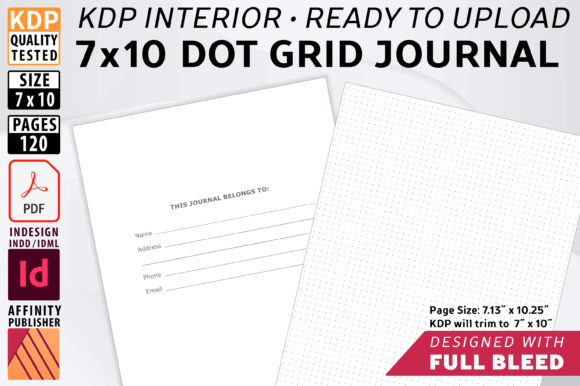
Understanding the technical specifications of this format is essential for publishers utilizing pre-made interiors. When working with a high-resolution print-ready PDF designed for this specific dimension, creators are engaging with a file sized at 7.13 x 10.25 inches. This slight oversizing is not an error but a critical requirement for full-bleed printing. KDP trims the final product down to exactly 7 x 10 inches, removing the excess margin to ensure that design elements, such as border lines or background textures, extend seamlessly to the edge of the paper. Failing to select the "Bleed" option during the KDP upload process will result in unintended white borders or rejected files, making adherence to these dimensional standards the first step in quality assurance.
The Strategic Advantage of Full-Bleed Interiors
Full-bleed design is frequently misunderstood by new self-publishers as merely an aesthetic choice, but it serves a functional purpose in book manufacturing. In the context of a dot grid journal, bleed ensures that the grid pattern appears consistent across every page, even after the mechanical trimming process. Without bleed, minor shifts during the binding and cutting phase can leave uneven margins that distract the user and signal low production value. By utilizing a template where the dot matrix extends to the 7.13 x 10.25 boundary, publishers guarantee a polished finish that rivals traditionally published stationery.
This attention to manufacturing detail directly impacts customer satisfaction and reviews. Readers expect the dots to align perfectly and the edges to be clean. When a publisher selects a pre-formatted interior that has been quality tested specifically for KDP’s bleed requirements, they eliminate the most common source of printing errors. This reliability allows creators to focus on cover design and keyword research rather than troubleshooting pagination issues or recalculating gutter margins manually. The peace of mind that comes from using a verified, print-ready file cannot be overstated in a volume-based publishing business model.
Optimizing the Dot Matrix for Usability
Not all dot grids are created equal. A significant feature of high-quality 7 x 10 dot grid journal templates is the opacity of the dots themselves. Standard black dots can sometimes appear too harsh, competing with the user's handwriting or sketches. Professional-grade interiors often utilize a 70% black value or a specific grey tone that allows the dots to fade into the background as the page is filled. This subtle design choice enhances the user experience significantly. It provides necessary guidance for straight lines and geometric shapes without creating visual clutter.
For educators, researchers, and designers who use these journals for diagramming or note-taking, this contrast ratio is vital. It transforms the journal from a simple notebook into a functional tool. When evaluating source files or templates, verifying this ink density is crucial. A template that offers editable master pages allows publishers to adjust this opacity if their target audience has specific preferences, such as lighter dots for artists who sketch in graphite or darker dots for those who write with fine-liner pens. This level of customization separates a generic commodity from a tailored product designed for a specific user persona.
Leveraging Source Files for Brand Differentiation
While the convenience of a ready-to-upload PDF is undeniable, the true long-term value of acquiring a 7 x 10 dot grid journal asset lies in the included source files. Access to Affinity Publisher (.afpub) and Adobe InDesign (.indd) files empowers publishers to move beyond the "no-editing-required" baseline. Customization is strongly recommended because the KDP marketplace is saturated with identical interiors. Using the exact same PDF as hundreds of other sellers makes it difficult to stand out. However, possessing the source files opens the door to unique modifications that can define a brand.
With editable master spreads, a publisher can introduce proprietary elements that add perceived value. This might include adding a specialized index page, integrating motivational quotes relevant to a specific niche like nursing or engineering, or modifying the footer to include branding elements. The ability to manipulate the 120-page structure means one base template can spawn dozens of distinct products. For example, a real estate agent could use the same 7x10 dot grid foundation as a yoga instructor, but by editing the source file to add property inspection checklists versus meditation trackers, they create two entirely different products targeting unrelated audiences.
The Safety and Efficiency of Template Formats
Workflow efficiency is paramount when managing a catalog of print-on-demand products. This is where dedicated template files (.afpubtemplate and .indt) differ from standard source documents. Templates act as protective shells for the original design architecture. When opening a template file, the software generates a new, untitled document based on the master settings. This prevents accidental overwrites of the core layout. Publishers never have to worry about corrupting their primary asset or losing the precise bleed settings that make the 7 x 10 format viable.
This distinction is particularly important for teams or businesses where multiple people might be accessing the design assets. It ensures consistency across product lines while allowing for safe experimentation. Furthermore, templates preserve linked styles, paragraph formats, and object libraries. If a publisher decides to change the font size of the page numbers or adjust the dot spacing globally, the template structure facilitates these changes across all future projects instantly. This systematic approach to design management reduces production time and minimizes human error, which is essential for scaling a self-publishing operation sustainably.
Practical Applications Across Diverse Audiences
The versatility of the 7 x 10 dot grid format makes it suitable for a remarkably broad demographic. Understanding these use cases helps publishers craft better metadata, covers, and marketing copy. For students and academics, this size is ideal for lecture notes that require both linear text and spatial diagrams. The dot grid supports the Cornell Note-Taking System naturally, allowing users to draw dividing lines without measuring. For professionals in STEM fields, the structured yet open nature of the grid facilitates technical drawing and data visualization better than lined paper.
In the creative sector, bullet journalists favor this size for its balance of portability and spread space. A 7x10 journal fits comfortably in most bags while providing enough horizontal real estate for weekly spreads and habit trackers. Hobbyists and crafters also utilize this format for project planning, where the ability to sketch patterns alongside written instructions is beneficial. By recognizing these specific applications, publishers can tailor their 7 x 10 dot grid journals to solve actual problems rather than simply selling blank paper. The inclusion of a "Belongs To" contact page in the standard 120-page layout further enhances utility for mobile professionals and students who may misplace their notebooks.
Navigating KDP Technical Requirements
Success on Amazon KDP hinges on strict adherence to technical guidelines. Even with a perfect interior file, the publishing setup must match. When uploading a 7 x 10 dot grid journal with bleed, the publisher must explicitly select the "Bleed" radio button in the KDP Book Details section. Selecting "No Bleed" will cause the system to treat the 7.13 x 10.25 file as a non-bleed document, resulting in safety margin errors or a shrunken live area. Conversely, selecting "Bleed" with a file that lacks the extra 0.125-inch margin will trigger rejection.
Publishers should also consider paper type and cover finish in relation to the interior content. Dot grid journals intended for markers or heavy ink usage generally perform better on white paper, whereas cream paper offers a warmer aesthetic for writers and readers but may show through more easily with heavy artistic media. Matte covers tend to pair well with academic and professional journals, conveying a serious, tactile quality, while glossy covers might suit student or hobbyist niches. These decisions, combined with a professionally formatted interior, create a cohesive product that meets market expectations. Testing the final proof, either digitally via KDP’s previewer or through a physical proof copy, remains the gold standard for ensuring the bleed trims correctly and the dot opacity prints as intended across different printing facilities.